Aastra OM XML : Driver configuration
The configuration window looks like this :
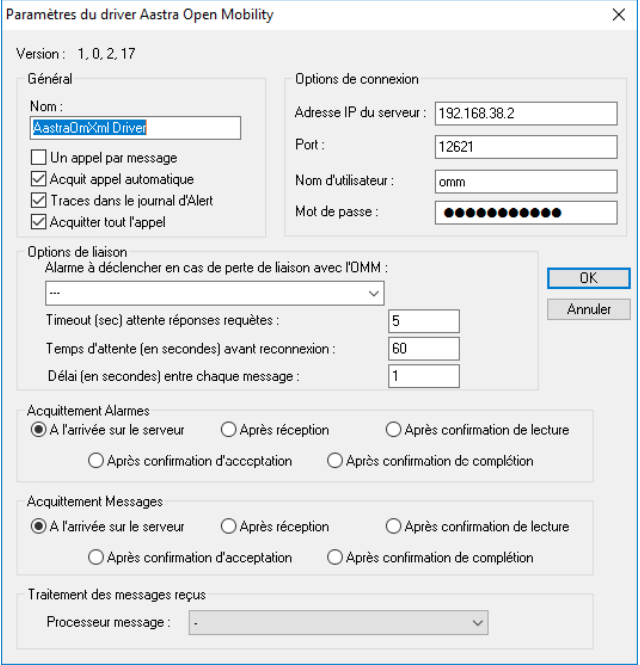
Here are the details for each section:
- General: Here you can choose the driver name, and enable or disable 4 options. These options are the grouping of messages in a single call, automatic acknowledgement of calls, display of traces in the Alert log and the ability to acknowledge all calls from an operator at the first notification from his phone (if the option is deactivated, only the alarm corresponding to the acknowledged message will be acknowledged).
- Connection options: In this section, enter the IP address of the main OMM, the IP port for connection (default 12621) and the login credentials.
- Link options: This section allows you to define the alarm to be triggered in Alert when the connection is lost, as well as the waiting time after a request before raising an error (if the OMM does not respond), the waiting time before reconnecting to the OMM (or secondary OMM) in the event of a lost connection and the delay between each message. 17/02/2017 Aastra OM XML driver configuration 6/6
- Alarms/Messages acknowledgement: This section lets you define which notification acknowledges the call triggered by an alarm or message. If the notification is an Acknowledgement, this corresponds to the button the user should press on the phone.
- Processing received messages: This section lets you define the script to be executed when data is received.