How to migrate a script for a GSM modem on COM port to the SMPP driver
Be careful: this FAQ is intended for advanced users with good knowledge of the message processor.
To migrate a script used for a COM port to the SMPP driver you need to do modifications in both prx and prg files.
Modification of the prx file
Open the prx file with a text editor (like notepad++).
1. Change the prototype
Change the line:
<Prototype id="X" name="<ScriptName>" label="<ScriptName>" type="2" running="1">
by
<Prototype id="X" name="<ScriptName>SMPP" label="<ScriptName>SMPP" type="5" running="1">
2. Change the interface
Change the line:
<Interface type="2"><SMS_Origin>0</SMS_Origin></Interface>
by
<Interface type="5"> <API_Timeout>0</API_Timeout> <API_ReverseTime>0</API_ReverseTime> <API_Length>0</API_Length></Interface>
Modification of the prg file
In the prg file you have also some modifications to do:
1. Change the reception function.
You may have a function RECEIVEFROM.
With SMPP driver you need to use the function
RECEIVE (sRecMessage, gnTimeout, 1)

2. Change of the message received
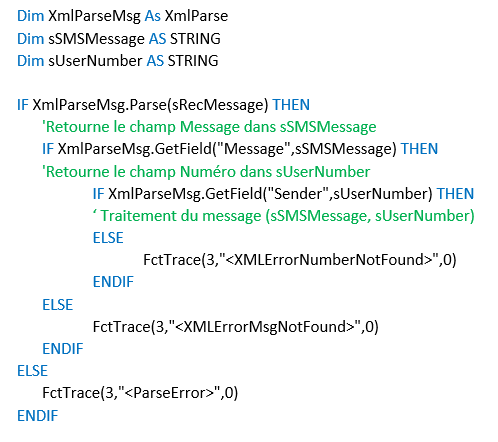
The sRecMessage that is returned by the function RECEIVE is an XML format.
- Reception of the message, the sUserMessage variable is already defined, you do not have to recreate it. You have to precise where to add the XML processing.
To have the message as a COM Port return it you need to write the following code: