GSM Modem: CMS error 512: User abort
CMS error 512 usually means that the modem encountered a communication error with the mobile network and could not send the message.
- 1. Check that your SIM card is working correctly: take it out of the modem, place it in a mobile phone and try to send an SMS, to make sure that there is no problem due to the SIM card (example: subscription expired).
- 2. Check the GSM signal, it must be sufficiently stable: go to Configuration -> Communication -> Monitor. The signal is indicated after the CSQ =. For a reliable installation, the signal must be greater than 10. If this is not the case, the modem must be moved to an area with a better signal or the GSM modem antenna must be moved with an extension cable.
- 3. In ALERT check that the modem is configured with the correct network operator of the SIM card (as below)
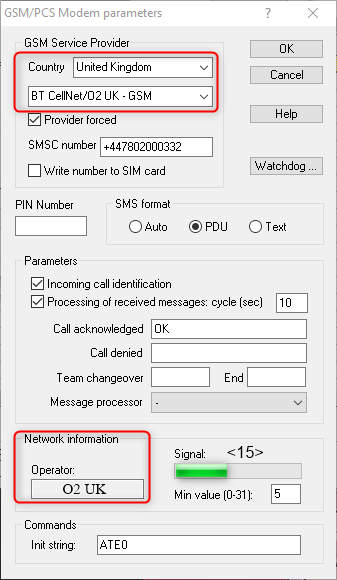
If the problem persists, activate trace recording between your Communication Port and ALERT (Configuration -> Communication: check the Recording box), then try sending sms again, and send our Support team <https://support@micromedia-int.com%3E/ the txt files present in your ComLog directory (which is located in the Alert installation directory, "C:\MMI" by default in version 3.6 or "C:\ProgramData\MicromediaAlert" in version 4 ).