Voice Synthesis: VSolo - Setup and use of dictionaries
This document aims to explain how to create and implement a dictionary with voice synthesis VSolo.
Dictionary creation
To create a dictionary for VSolo text-to-speech, you need the utility
rsude.exe (User Dictionnary Editor), located in the directory
C:\MMI\Tts\Scansoft\RealSpeakSolov4\speech\components\common
Running this file brings up this window:

The first step is to either open an existing dictionary file or create a new one.
To do this, select File -> Open and select a dictionary file, or select File -> New and enter a dictionary file name.
The file extension will be .bdc.
The file name then appears in the "Selected Dictionary" field.

You now need to fill in the « Dictionary Language » field, the language used for this dictionary.
To add words to the dictionary, either :
- Select the « Edit -> Insert entry » menu
- Right click the « Dictionary Entries » part, and choose the « Insert
Entry » menu
You can now add words or letters you wish to transcript.
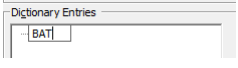
Then press "ENTER" to confirm.
Next, add the transcription for this word.
To do this, right-click on the word

Select the type of transcription you wish to make from the list.
Then enter the transcript in the field and press ENTER to confirm.
To validate that the transcription is correctly spoken with the synthesis, simply right-click and select
then select "Speak".

The word will then be spoken over the PC's speakers.
You can then enter other words in the same way.
When you've finished, it's time to save your file.
To do this, simply click on "File -> Save".
Warning: if you don't save your file and close the program
rsude.exe, all your work will be lost.
Setting up a dictionary in ALERT
Once the dictionary has been created, open the ALERT voice server window (configuration ->
voice server), then go to the "Text-to-speech" tab.
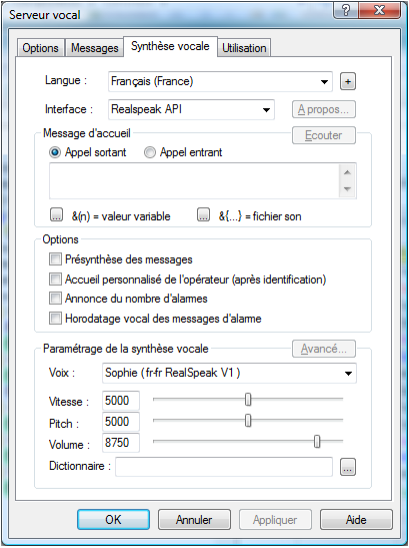
Press the "..." button in the bottom right-hand corner of the "Dictionary" menu to browse and select the
select the .bdc file you've just created.
Confirm with OK.
You will then need to restart the Alert software for the dictionary to be correctly
correctly.
Helpful hints
The rsude.exe help file is fairly clear and precise.
It can be accessed from the "Help" -> Help menu.