Insert SIM card
First, use a Phillips screwdriver to remove the cover.
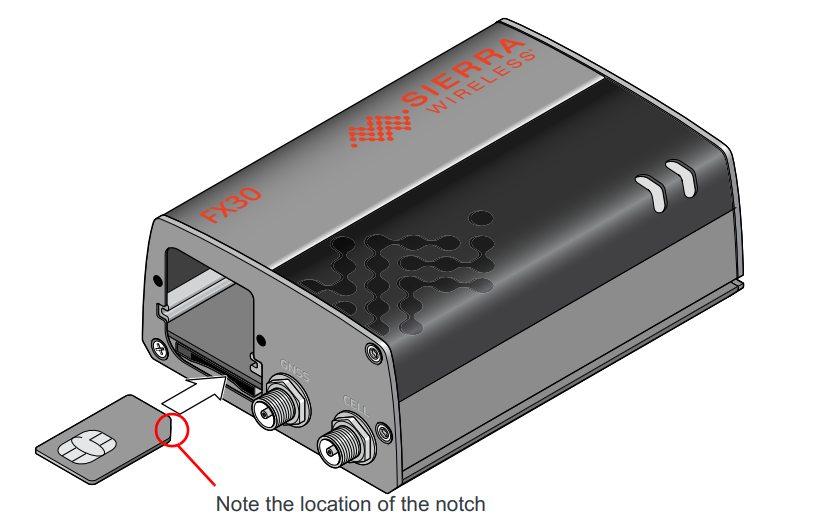
Orient the SIM card, as shown in next figure. The gold contacts on the SIM card facing
up.
Gently slide the SIM card into the slot until it clicks into place.
To remove the SIM card, press it in, and release it. Gently grip the SIM card and pull it
out.
Reattach the cover.
Connect the FX30
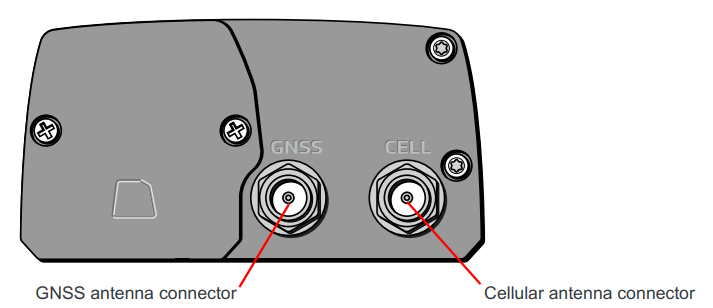
Before connecting a power supply, connect the cellular antenna on "CELL". The "GNSS" connector is used for location (Global Navigation Satellite Systems).
Then connect the modem to the IP network with the RJ45 connector.
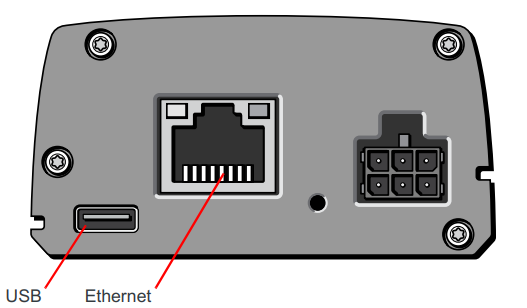
Finally, connect the power. (Power supply is provided).
There are two led on the device: power LED and user LED.
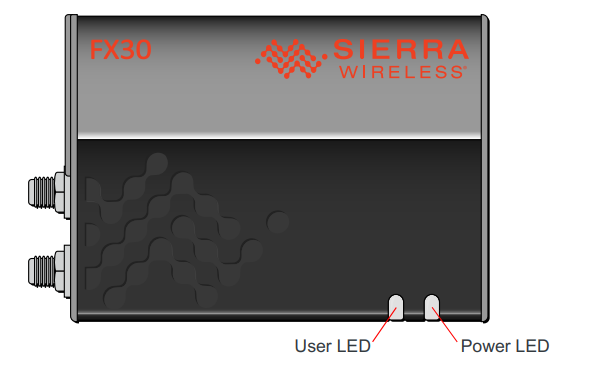
The Power LED can be:
- Off: No power or input voltage ≥ 32 VDC or ≤ 4.75 VDC
- Solid Red: Gateway is powered on, not attached to cellular network.
- Solid Amber: Attached to cellular network.